
Introduction
You launched your website. You spent hours choosing the right design, added your services, wrote a few blog posts, and finally clicked the “Publish” button.
Then you waited.
A few days passed. Then a few weeks.
You searched Google for your business name, your services, and even the exact title of your blog post—but your website was nowhere to be found.
If that sounds familiar, you’re not alone.
One of the biggest misconceptions about SEO is that simply creating a website is enough to start getting traffic from Google. In reality, Google evaluates hundreds of signals before deciding which pages deserve to appear on the first page of search results. Every day, millions of new pages are published, all competing for attention. Standing out requires more than just having a website.
Over the years, we’ve audited websites for businesses across different industries, from local service providers to growing brands. A common pattern always appears: most websites don’t have one major issue—they have several smaller issues that work together to limit their visibility. Sometimes it’s poor keyword targeting. Other times it’s weak content, technical problems, or a lack of authority.
The encouraging news is that most of these problems can be fixed.
In this guide, we’ll walk through the most common reasons websites struggle to rank on Google and, more importantly, explain what you can do to improve your chances. Whether you’ve just launched your first website or you’ve been trying to improve your SEO for months, these insights will help you build a stronger foundation for long-term growth.
Let’s begin with the first and most overlooked issue.
Why Ranking on Google Is Harder Than Ever
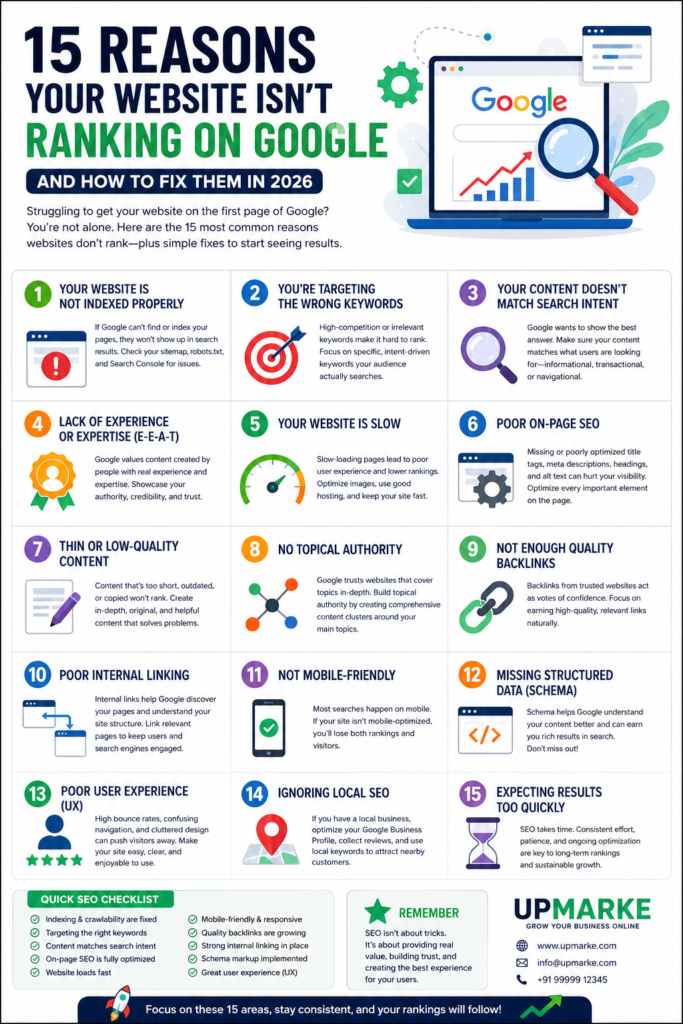
SEO has changed significantly over the past few years.
Google no longer ranks pages based only on keywords or backlinks. Its algorithms now evaluate the overall quality of a page, the credibility of the publisher, user experience, content freshness, and whether the information genuinely helps people.
In addition, AI-powered search experiences and increasingly sophisticated ranking systems mean businesses must focus on creating content that solves real problems instead of simply targeting keywords.
That’s why publishing ten average blog posts often produces weaker results than publishing one comprehensive, well-researched article that answers a user’s question thoroughly.
If your website isn’t ranking today, don’t assume Google is ignoring you. More often than not, Google simply hasn’t found enough evidence that your page is the best answer for a searcher’s query.
The following sections explain how to change that.
1. Your Website Is Not Indexed Properly
One of the simplest reasons a website doesn’t appear on Google is that Google hasn’t added it to its index yet.
Think of Google’s index as a massive digital library. If your pages aren’t included in that library, they can’t appear in search results, no matter how well they’re written.
This is especially common with:
- Newly launched websites
- Recently published blog posts
- Websites with technical errors
- Pages accidentally blocked from search engines
Many business owners assume Google automatically finds every new page. While Google is excellent at discovering content, it still needs clear signals that a page exists and should be indexed.
How to Check if Your Website Is Indexed
A quick way to check is by searching:
site:yourdomain.comIf only a few pages appear—or none at all—it may indicate an indexing issue.
You should also review your website in Google Search Console. It can show whether pages are indexed, excluded, or blocked, and often provides a reason.
Common Indexing Problems
Some of the most frequent issues include:
- The page is marked as noindex
- Important pages are blocked in
robots.txt - Missing or outdated XML sitemap
- Broken internal links
- Duplicate pages confusing Google
- Server errors preventing Google from accessing the site
These issues are often easy to fix, but leaving them unresolved can prevent your content from appearing in search results.
What You Should Do
Start by ensuring your XML sitemap is up to date and submitted through Google Search Console. Check that important pages are not blocked by mistake, and make sure each page is linked from another page on your website.
Remember, even the best content can’t rank if Google can’t access it.
2. You’re Targeting the Wrong Keywords
This is one of the biggest mistakes we see, especially with new businesses.
Imagine opening a new coffee shop and trying to compete with every major coffee chain in the country on day one. It would be incredibly difficult, even if your coffee was excellent.
The same principle applies to SEO.
Many businesses try to rank for broad, highly competitive keywords like:
- SEO
- Digital Marketing
- Website Design
- Marketing Agency
These terms are searched thousands of times each month, but they’re also dominated by well-established websites with years of authority, thousands of backlinks, and extensive content libraries.
Competing directly against them is rarely the best strategy.
Focus on Specific, Intent-Driven Keywords
Instead of broad terms, target keywords that reflect exactly what your audience is searching for.
For example:
❌ Digital Marketing
✅ Digital Marketing Agency for Small Businesses in Delhi
❌ SEO
✅ Local SEO Checklist for Indian Businesses
❌ Website Design
✅ Affordable Website Design for Service Businesses
These longer, more specific phrases often have lower competition and attract visitors who are closer to making a decision.
Understand Search Intent
Keyword research isn’t just about search volume. You also need to understand why someone is searching.
Ask yourself:
- Are they looking for information?
- Are they comparing options?
- Are they ready to hire a service?
- Are they trying to solve a specific problem?
When your content aligns with that intent, Google is more likely to consider it relevant.
A Practical Tip
Before choosing a keyword, search it yourself.
Look at the first page of Google.
If the results are dominated by industry giants with thousands of backlinks and extensive resources, consider targeting a more specific variation where your content has a realistic chance to compete.
3. Your Content Doesn’t Match Search Intent
You can write a well-designed, detailed article, but if it doesn’t answer what users are actually looking for, it probably won’t rank well.
Google’s primary goal is to provide the most useful answer to every search query. That’s why understanding search intent is one of the most important aspects of SEO.
Let’s take an example.
Someone searches:
“How to improve website speed.”
They expect practical advice, tools, and step-by-step guidance.
If they land on a page that’s mostly promoting website development services without explaining how to improve speed, they’re likely to leave quickly.
That sends a signal that the page didn’t meet their needs.
The Four Main Types of Search Intent
Informational
The user wants to learn something.
Example:
- What is Local SEO?
- How Google Indexing Works
Navigational
The user wants to reach a specific website or brand.
Example:
- Google Search Console
- YouTube Studio
Commercial Investigation
The user is comparing options before making a decision.
Example:
- Best SEO Agency in Delhi
- Semrush vs Ahrefs
Transactional
The user is ready to take action.
Example:
- Hire SEO Expert
- Buy SEO Audit
Understanding which category your keyword falls into helps you create content that genuinely satisfies readers.
How to Improve Content Relevance
Before writing, ask:
- What question is the reader trying to answer?
- What problem are they facing?
- What information would make them stop searching?
The more completely your content addresses those questions, the stronger its chances of performing well.
4. Your Website Doesn’t Demonstrate Experience or Expertise
Google wants to recommend content created by people and businesses that understand their subject.
This is where EEAT—Experience, Expertise, Authoritativeness, and Trustworthiness—becomes important.
If your website makes big claims without showing any evidence, it’s harder for both users and search engines to trust your content.
Think about it from a visitor’s perspective.
If you’re looking for SEO help, would you trust a page that simply says, “We’re the best SEO agency,” or one that explains its process, shares real examples, discusses challenges, and demonstrates results?
Most people would choose the second option.
How to Build Experience Into Your Content
Instead of writing general advice, include insights from real work you’ve done.
For example, rather than saying:
“SEO helps websites rank better.”
You could explain:
“During one of our website audits for a service-based business, we discovered that nearly 40% of their pages weren’t indexed because of an incorrect noindex setting. After resolving the issue and improving internal linking, their organic visibility began to improve over the following months.”
Specific examples make your content more believable and useful.
Show Expertise Without Overstating It
Expertise isn’t about using complicated language. It’s about explaining concepts clearly and accurately.
Whenever possible:
- Break down complex topics into simple language.
- Support recommendations with practical reasoning.
- Keep information updated.
- Avoid exaggerated promises like “Rank #1 in 30 days.”
Readers appreciate honesty, and Google increasingly rewards content that demonstrates genuine expertise rather than hype.
5. Your Website Is Slow (And Visitors Leave Before It Loads)
Have you ever clicked on a website, waited a few seconds, and then closed it because it was taking too long to load?
Most people have.
Now imagine hundreds of visitors doing the same thing on your website. Google notices these patterns. If users consistently leave because your site feels slow or frustrating, it becomes harder to compete with faster websites that provide a smoother experience.
Website speed has been a ranking factor for years, but in 2026 it’s about more than just SEO. A fast website improves user experience, builds trust, and increases the likelihood that visitors will stay, explore, and eventually become customers.
What Makes a Website Slow?
During SEO audits, we often see the same issues repeatedly:
- Large, uncompressed images
- Cheap or overloaded hosting
- Too many plugins
- Unnecessary JavaScript and CSS files
- No browser caching
- Slow server response times
One issue alone might not seem serious, but together they can significantly reduce your website’s performance.
Why Speed Matters Beyond Rankings
Imagine two businesses offering the same service.
The first website loads in two seconds.
The second takes eight seconds.
Even if both have excellent content, most users will naturally prefer the faster experience. That often leads to longer visit durations, more page views, and higher conversion rates.
How to Improve Website Speed
Start with the basics:
- Compress images before uploading them.
- Use modern image formats such as WebP where possible.
- Choose reliable hosting instead of the cheapest available option.
- Remove unnecessary plugins and scripts.
- Enable browser caching.
- Use a Content Delivery Network (CDN) if you serve visitors from multiple locations.
Speed improvements usually benefit both users and search engines, making them one of the most valuable technical SEO investments.
6. Your On-Page SEO Needs Improvement
Think of on-page SEO as helping Google understand what your page is about.
Without clear signals, even great content can struggle to rank because search engines aren’t completely sure how it should appear in search results.
Many websites focus heavily on publishing articles but overlook the small details that influence visibility.
Key Elements of On-Page SEO
Write Clear Title Tags
Your title tag is often the first thing people see in Google Search.
Instead of this:
Home
Try something descriptive:
Why Your Website Isn’t Ranking on Google (15 Reasons & Fixes)
A strong title tells both users and Google exactly what the page covers.
Use Proper Heading Structure
Organize your content with logical headings.
Example:
- H1 – Main Topic
- H2 – Main Sections
- H3 – Supporting Points
This makes your content easier to read and easier for search engines to understand.
Write Helpful Meta Descriptions
Although meta descriptions don’t directly improve rankings, they can increase click-through rates.
A clear description encourages people to choose your result over others.
Optimize Images
Images add value to your content, but they should also be optimized.
Good practices include:
- Descriptive file names
- Relevant ALT text
- Compressed file sizes
For example:
❌ IMG001.jpg
✅ website-ranking-checklist.webp
Add Internal Links
Internal links help visitors discover related content while also helping Google understand your website’s structure.
For example, if you’re discussing local SEO, link to another article explaining Google Business Profile optimization.
Strong internal linking distributes authority across your website and keeps readers engaged longer.
7. Your Content Is Too Thin or Doesn’t Offer Real Value
One of the biggest SEO myths is that publishing more content automatically leads to better rankings.
It doesn’t.
Google isn’t looking for the highest number of articles. It’s looking for the most helpful answers.
We’ve reviewed websites with hundreds of blog posts that received almost no organic traffic because each article covered the topic only briefly without offering anything unique.
What Thin Content Looks Like
Thin content often includes:
- Very short articles with little detail
- Repeating information found on dozens of other websites
- Generic advice without examples
- Content written only to include keywords
Readers quickly recognize when an article doesn’t answer their questions, and they leave to find a better resource.
What High-Quality Content Looks Like
Helpful content usually includes:
- Step-by-step explanations
- Practical examples
- Original insights
- Real experiences
- Actionable advice
- Updated information
For example, instead of writing:
“Improve your website speed.”
Explain exactly how someone can do it, what tools to use, common mistakes to avoid, and how to measure improvements.
The goal should always be to make the reader feel they learned something valuable.
Quality Wins Over Quantity
Publishing one detailed article every week is often more effective than publishing five shallow articles that provide little value.
Consistency matters, but usefulness matters even more.
8. You Haven’t Built Topical Authority Yet
Google doesn’t just evaluate individual pages.
It also evaluates your website as a whole.
If you publish one article about SEO and nothing else related to the topic, it’s difficult for Google to view your website as an authority in that area.
Now compare that with a website that has comprehensive resources covering:
- Technical SEO
- Local SEO
- Keyword Research
- Website Audits
- Core Web Vitals
- Google Business Profile
- AI Search Optimization
- Content Marketing
- Link Building
- SEO Case Studies
Which website appears more trustworthy?
Usually the second one.
What Is Topical Authority?
Topical authority means demonstrating consistent expertise across an entire subject rather than focusing on isolated articles.
Think of your website as a library.
A library with one book about marketing isn’t particularly impressive.
A library with fifty well-organized books covering every aspect of marketing is much more valuable.
Google tends to reward websites that demonstrate depth rather than isolated knowledge.
Build Content Clusters
Instead of creating random blog posts, organize them around a central topic.
For example:
Main Guide
- Complete SEO Guide for Small Businesses
Supporting articles:
- Keyword Research Guide
- Technical SEO Checklist
- Local SEO Guide
- SEO Audit Checklist
- Google Search Console Tutorial
- Common SEO Mistakes
- Website Speed Optimization
- Internal Linking Strategy
Each supporting article should link back to the main guide and to related articles where appropriate.
This creates a strong internal content network that benefits both users and search engines.
9. Your Website Doesn’t Have Enough High-Quality Backlinks
Backlinks remain one of Google’s strongest trust signals.
When another reputable website links to your content, it’s similar to receiving a recommendation.
However, not all backlinks are equal.
A single link from a respected industry website can be more valuable than dozens of links from low-quality directories.
Why Backlinks Matter
Imagine you’re choosing between two restaurants.
One has been recommended by several trusted friends.
The other has no recommendations at all.
Most people naturally trust the first option.
Google uses backlinks in a similar way.
When reputable websites reference your content, it suggests that your information is useful and trustworthy.
Focus on Earning, Not Buying
Buying backlinks may seem like a shortcut, but it often creates more problems than benefits.
Instead, focus on earning links naturally through valuable content.
Some effective approaches include:
- Publishing original research
- Creating detailed industry guides
- Sharing case studies
- Designing useful checklists
- Developing free tools or templates
- Writing guest articles for reputable websites
These strategies take more effort, but they build sustainable authority over time.
A Common Mistake
Many businesses become obsessed with backlink numbers.
Quality is far more important than quantity.
Ten relevant, trustworthy backlinks usually provide more value than hundreds of low-quality links from unrelated websites.
A Quick SEO Health Check
Before moving on, ask yourself these questions:
- Is my website fast enough for visitors?
- Are my pages optimized with proper titles and headings?
- Does my content genuinely solve readers’ problems?
- Am I building authority around one topic instead of publishing random articles?
- Am I earning trustworthy backlinks through valuable content?
If you answered “no” to several of these, don’t worry. SEO is an ongoing process, not a one-time task. Improving these areas step by step can make a noticeable difference over time.
10. You’re Not Using Internal Links Effectively
Internal linking is one of the most underrated SEO strategies.
Many business owners publish a blog post, click “Publish,” and never link to it again. Over time, dozens of useful articles become isolated pages that neither visitors nor search engines can easily discover.
Think of your website as a city.
Every page is a building, and internal links are the roads connecting them. If there are no roads, reaching those buildings becomes difficult. Google works in a similar way. It follows links to discover pages and understand how different topics relate to one another.
A good internal linking strategy helps Google understand which pages are the most important on your website.
Why Internal Links Matter
Internal links help you:
- Distribute authority across your website
- Keep visitors reading longer
- Reduce bounce rates
- Help Google discover new pages faster
- Build topical authority
For example, if someone is reading an article about Local SEO, they might also benefit from articles covering:
- Google Business Profile Optimization
- Technical SEO Checklist
- Keyword Research Guide
- Common SEO Mistakes
These links create a better experience for readers while strengthening your website’s overall structure.
Best Practices
Whenever you publish a new article, ask yourself:
- Which older articles should link to this one?
- Which related articles should this page recommend?
Also, use descriptive anchor text instead of generic phrases.
Instead of:
Click here
Use:
Learn how to perform a complete SEO audit.
Small improvements like these make your content more useful for both users and search engines.
11. Your Website Isn’t Optimized for Mobile Users
Today, most searches happen on mobile devices.
Google primarily evaluates the mobile version of your website when determining rankings. If your website works well on desktop but performs poorly on smartphones, it could negatively affect your visibility.
More importantly, it affects your visitors.
Imagine someone searching for your services while commuting or during a lunch break. They open your website, but the text is too small, buttons are difficult to tap, and images don’t fit the screen.
Most users won’t try to fix the experience—they’ll simply leave.
Common Mobile SEO Problems
During website audits, these are some of the issues we encounter most often:
- Text that’s difficult to read
- Buttons placed too close together
- Slow mobile loading speeds
- Pop-ups covering important content
- Images extending beyond the screen
- Navigation that’s difficult to use
Every one of these issues creates friction for users.
How to Improve Mobile Experience
Your website should feel effortless to use on any device.
A few simple improvements include:
- Use responsive website design.
- Make buttons easy to tap.
- Increase font sizes for readability.
- Compress large images.
- Test your website on multiple screen sizes.
- Keep navigation simple and intuitive.
Remember, mobile optimization isn’t just about rankings. It’s about respecting your visitors’ time and making their experience as smooth as possible.
12. You’re Missing Structured Data (Schema Markup)
Imagine handing Google a neatly organized summary of your content instead of asking it to figure everything out on its own.
That’s essentially what structured data does.
Schema markup helps search engines better understand your website’s information. While it isn’t a magic ranking factor, it improves the way Google interprets your pages and can increase your chances of earning rich results in search.
Useful Schema Types
Depending on your website, you may benefit from:
- Organization Schema
- Local Business Schema
- Article Schema
- FAQ Schema
- Breadcrumb Schema
- Service Schema
- Review Schema (only for genuine reviews)
Each type provides additional context about your content.
For example, FAQ Schema can sometimes help Google display expandable questions directly in search results, making your listing more noticeable.
Why It Matters
Structured data improves communication between your website and search engines.
It helps Google understand:
- Who you are
- What services you offer
- Where your business operates
- What your article covers
- How pages connect together
When combined with high-quality content, schema markup becomes another signal that your website is well organized and trustworthy.
13. Visitors Aren’t Having a Good Experience
Google’s goal isn’t simply to rank websites.
Its goal is to satisfy searchers.
If visitors land on your website and immediately leave because the page is confusing, cluttered, or difficult to use, that’s not a good experience.
Although Google doesn’t use a single “user experience score,” many experience-related signals indirectly influence SEO performance.
Signs Your Website May Need Improvement
Ask yourself:
- Is the page easy to read?
- Does it answer the visitor’s question quickly?
- Is important information easy to find?
- Are there too many distractions?
- Is the design clean and professional?
Visitors should never feel lost.
Improve Readability
Long walls of text can overwhelm readers.
Instead:
- Use shorter paragraphs.
- Break content into sections.
- Add descriptive headings.
- Include bullet points where appropriate.
- Use images, charts, or illustrations to explain complex ideas.
The easier your content is to consume, the more likely people are to stay and continue reading.
Build Trust
Visitors are more likely to engage with businesses that appear credible.
Consider including:
- Team information
- Client testimonials
- Case studies
- Contact information
- Business address
- Privacy Policy
- Terms & Conditions
These elements help reassure both users and search engines that your business is genuine.
14. You’re Ignoring Local SEO
If your business serves a specific city or region, local SEO shouldn’t be an afterthought—it should be one of your priorities.
Many businesses focus entirely on national keywords while overlooking local searches that often have much higher buying intent.
For example, someone searching for:
SEO Agency
might just be researching.
But someone searching for:
SEO Agency in Delhi
is often much closer to making a decision.
Strengthen Your Local Presence
Here are a few practical steps:
- Complete your Google Business Profile.
- Use consistent business information across directories.
- Collect genuine customer reviews.
- Create location-specific service pages.
- Add Local Business Schema.
- Include location-based keywords naturally.
Don’t Forget Local Content
Instead of publishing only general marketing articles, create content relevant to your local audience.
Examples include:
- SEO Tips for Delhi Businesses
- Local SEO Guide for Service-Based Companies
- How Small Businesses Can Get More Leads from Google Maps
These articles can help attract visitors who are actively looking for services in your area.
15. You’re Expecting SEO Results Too Quickly
Perhaps the biggest misconception about SEO is that results happen overnight.
They don’t.
SEO is a long-term investment.
Google needs time to:
- Discover your pages.
- Understand your content.
- Evaluate quality.
- Build trust.
- Compare your website with competitors.
Even after making improvements, it may take weeks or months before rankings noticeably improve.
What Influences SEO Timelines?
Several factors affect how quickly results appear:
- Website age
- Competition level
- Content quality
- Technical health
- Backlink profile
- Publishing consistency
A new website competing in a competitive industry naturally takes longer than an established website targeting niche keywords.
Focus on Progress, Not Perfection
Instead of checking rankings every day, monitor meaningful improvements such as:
- More indexed pages
- Increased impressions
- Higher click-through rates
- Longer engagement time
- More qualified leads
These indicators often improve before major ranking gains become visible.
SEO rewards businesses that stay consistent.
Your SEO Action Checklist
If your website isn’t ranking well, work through this checklist:
✅ Check that all important pages are indexed.
✅ Target realistic, intent-driven keywords.
✅ Publish original, comprehensive content.
✅ Improve website speed.
✅ Optimize title tags, headings, and meta descriptions.
✅ Build strong internal links.
✅ Improve mobile usability.
✅ Add relevant schema markup.
✅ Earn high-quality backlinks naturally.
✅ Strengthen your local SEO presence.
✅ Update older articles regularly.
✅ Measure performance using Google Search Console and analytics.
You don’t need to fix everything in one week.
Consistent improvements over time usually outperform occasional large changes.
Final Thoughts
If your website isn’t ranking on Google today, don’t assume it never will.
In most cases, the problem isn’t one major issue. It’s a combination of technical SEO, content quality, user experience, authority, and consistency.
The businesses that perform well in search aren’t always the biggest or oldest. They’re the ones that continuously improve their websites, publish genuinely helpful content, and focus on solving real customer problems.
Every improvement you make—whether it’s optimizing a page, publishing a better article, improving website speed, or earning a trusted backlink—moves your website in the right direction.
SEO isn’t about finding shortcuts or chasing every algorithm update.
It’s about building a website that deserves to rank because it genuinely helps people.
If you focus on that mindset, better rankings become a natural outcome rather than the only goal.
What’s Next?
If you’ve completed this guide, start with one section that needs attention instead of trying to overhaul your entire website overnight.
Small, consistent improvements compound over time.
And remember, SEO is a marathon, not a sprint. The work you do today can continue generating traffic, leads, and customers for months or even years to come.
Frequently Asked Questions
1. Why is my website not appearing on Google?
There are several possible reasons. Your pages may not be indexed, your content may not match what users are searching for, or your website could have technical SEO issues that prevent Google from understanding or trusting your pages. The first step is checking your website in Google Search Console to identify any indexing or crawl errors.
2. How long does it take for a website to rank on Google?
SEO is a long-term process. A new website typically takes several months before it begins gaining consistent visibility, while competitive industries may require even more time. Regularly publishing valuable content and improving your site’s technical health usually leads to gradual, sustainable growth.
3. Can I rank on Google without backlinks?
It’s possible to rank for low-competition keywords without many backlinks, especially if your content is highly relevant and well optimized. However, for competitive search terms, earning links from trusted and relevant websites remains an important factor in building authority.
4. Does website speed really affect SEO?
Yes. A fast-loading website creates a better experience for visitors and helps search engines crawl your pages more efficiently. Faster websites also tend to keep users engaged longer, which can positively influence overall performance.
5. How often should I publish new content?
Consistency matters more than volume. Publishing one well-researched, helpful article each week or every two weeks is generally more effective than publishing multiple low-quality articles. Focus on solving real problems rather than simply increasing the number of posts.
6. What is the biggest SEO mistake businesses make?
One of the most common mistakes is creating content without understanding search intent. Many websites target highly competitive keywords or publish articles that don’t fully answer users’ questions. Successful SEO starts with understanding what people actually need and providing the best possible answer.
7. Is SEO still worth investing in during 2026?
Absolutely. While search has evolved with AI-powered experiences, businesses still rely on Google to discover products, services, and information. Websites that publish trustworthy, experience-driven content and maintain strong technical SEO continue to earn valuable organic traffic.

Leave a Reply